 Schildmark
Security
How we keep your data apart
A security product has to be careful with what it collects. This page says how Schildmark separates customers, what leaves your network, and what our staff can and cannot do.
One stack per customer
Each organisation gets its own stack: its own containers, databases, certificates and credentials, on its own server. Hosted stacks get their own cloud server too. Nothing that holds customer data is shared with another customer.
Every password, key, token and certificate authority is generated on your server during the install. None is built into an image. Internal services have no host port; only the gateway and the agent port are published.
If you add the hosted analyst or hosted patching, they run in containers of your own, on networks no other customer is attached to, and reach your stack over one connection your stack opens: mutual TLS 1.3, each side pinning the other’s certificate. They sign in with their own restricted accounts, and what they store stays in your stack.
What leaves your network
| Data | Goes to | When |
|---|---|---|
| Stack health, version, the agent list | Our control plane | Every 5 minutes |
| Generated secrets and the stack’s CA | Our control plane, sealed | Once, so a second server or a re-install can use them |
| The first administrator’s password | Nowhere: shown only in your terminal | — |
| Alerts, events, vulnerabilities, inventory | Not sent to us | — |
| Questions and data the analyst reads | The model endpoint you choose | When the analyst is used |
| Vendor API calls | AWS, Cloudflare, Microsoft, Sophos and the others you connect | When configured |
A hosted stack keeps all of its data on our infrastructure, isolated per customer. With the hosted analyst or hosted patching, the alert, inventory and vulnerability data they read leaves your infrastructure while they work on it.
Signed jobs, no shell
- Outbound only
- Endpoints open no port. The patching agent connects out over HTTPS.
- Its own key
- Each machine creates an Ed25519 key during install; only the public half leaves it. Every request is signed, fresh and used once.
- Signed jobs
- A job runs only if it is signed by your stack’s key, pinned at enrolment, names this machine and has not expired.
- A fixed list of actions
- Exact package versions, Windows KBs, restart, start, stop, uninstall. There is no shell and no “run command”.
- Revocation
- Removing a machine revokes its enrolment; its next request is refused.
Support access you can switch off
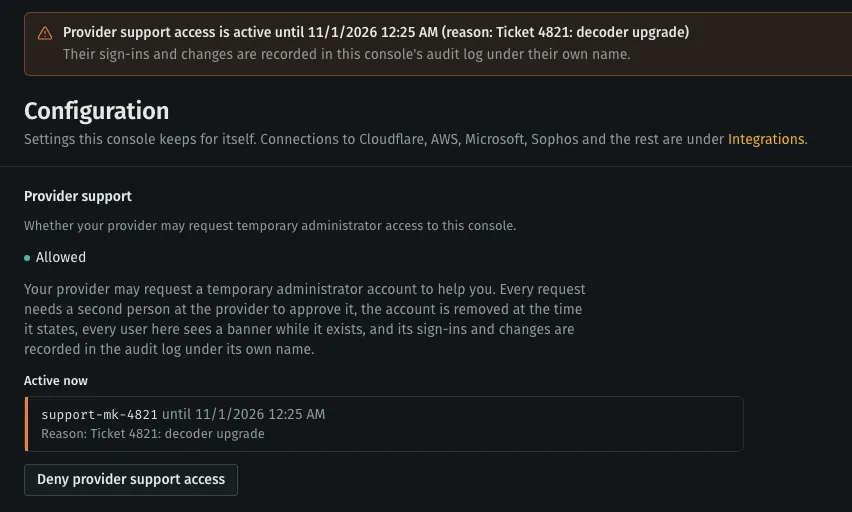
Our support engineers can get a temporary administrator account in your console to help you, and only while your setting allows it. Your administrators can deny it at any time; denying ends active access at once.
- Four eyes
- Every request has a reason and needs a second person at our side to approve it. Unapproved requests expire after an hour.
- Time-limited
- 15 minutes to 4 hours. Your stack removes expired accounts on its own, even if we cannot reach it.
- Visible
- Every user sees a banner while it is active, and every sign-in and change is in your audit log under the support account’s own name.
Sign-in, and our staff
- Your users
- Passwords of at least 12 characters with mixed case, digits and symbols, or single sign-on with Entra ID, Okta, Google Workspace or any OpenID Connect provider, where your own MFA applies. Access is granted page by page, per role.
- Audit log
- Sign-ins, changes and responses are recorded in your console.
- Our staff
- Sign in to our control plane with two-factor authentication, which is required for every staff account. Changes need an administrator role and are audited per customer.
- Sealed secrets
- Integration secrets you give us are stored encrypted and opened only to build a signed job for your server.
Data you keep
You set how long alerts are kept, from 7 days to 10 years. A licence that ends never deletes data or stops the stack. You can export evidence and take backups at any time, and on a self-hosted stack the data never leaves your servers in the first place.
Known limits
We list what is not done yet rather than leave it for you to find:
- Inside a stack, the engine’s API certificate is not yet pinned by the services that call it on the internal network.
- Internal service-to-service authentication uses static generated keys, one per pair of services.
- The Windows setup wizard is not yet signed with a code-signing certificate; its checksum is published next to it.
Questions from your security review?
Send us your questionnaire. We answer it from how the product works, not from a brochure.