 Schildmark
Platform
Block at the border you already have
Schildmark does not add another appliance. It blocks an attacking address on the firewalls and cloud services you already run, and keeps who did it, when and why.
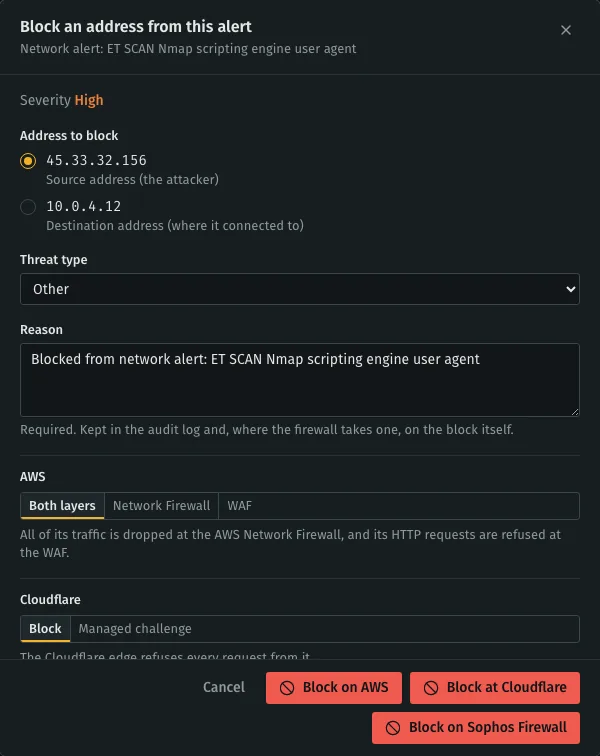
One dialog, every blocking point
Choose Block source IP on an alert. The attacker’s address is preselected, you give a reason, and you choose where to enforce it when more than one point is connected.
- Reason required
- Kept in the audit log and, where the firewall takes one, on the block itself.
- Your rules stay yours
- Schildmark only adds and removes its own entries in one group or alias. It never edits your policies.
- Read back
- Blocked IPs lists every address per blocking point, and shows when a block is not in force everywhere.
Where it can block
Connect any of these in the console. Single IPv4 addresses on the on-premises firewalls for now.
- FortiGateaddress group your deny policies use
- Sophos FirewallIP host group your drop rules use
- OPNsensealias your block rules use
- AWS WAFlayer 7, an IP set
- AWS Network Firewalllayer 3/4, a rule group
- Cloudflareblock or managed challenge at the edge
- Azure network security groupSchildmark’s own deny rules
- Google Cloud VPC firewallfirewall rules Schildmark manages
- DigitalOcean Cloud Firewalldeny rules on the firewall you name
pfSense is not supported: it has no official API. Blocking on the endpoints themselves is not offered from the console; the monitoring agents’ own automatic blocks are shown under Active response.
Rules that act, with a person in the loop
The policy engine runs conditions over your endpoint and network alerts and blocks, mutes or e-mails when they match. Backtest a rule against past events before you turn it on. A rule can require approval: its actions wait until someone approves or rejects them, with a reason.

Addresses that are never blocked
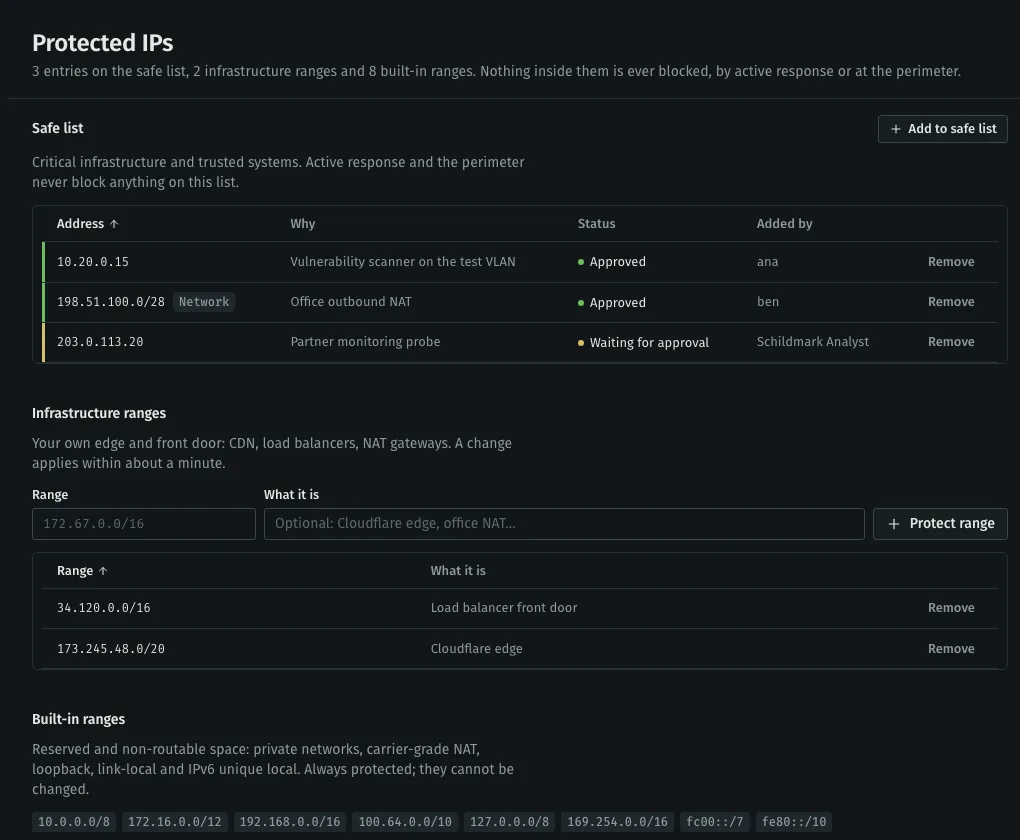
Whichever path asks for a block, a rule, the analyst or a person, it is skipped and recorded when the address is protected. Add your own public egress addresses before you turn on automatic blocking.
- Safe list
- Partners, scanners you run, monitoring services. Single addresses or ranges, each with a reason.
- Infrastructure ranges
- Your own edge: load balancers, NAT gateways, office egress.
- Built in
- Private, carrier-grade NAT, loopback and link-local ranges. Cannot be changed.
Talk to sales
Tell us about your machines, your firewalls and the audit you are preparing for. We answer within one working day.