 Schildmark
Your network has a border. Schildmark watches it.
Detection and response for endpoints, servers, cloud accounts and firewalls, with automatic patching driven by the analyst and audit evidence built in. One agent on each machine. Hosted by us, or run on your own servers.
Ask. It finds the hole, explains it, and patches it.
Ask the analyst what is exploitable, or open an alert. It names the package, the machines and the fixed version in plain words, and proposes the fix. Turn on unattended approval and routine fixes go out on their own: rehearsed first, verified after. Critical machines still wait for two people.

Google Chrome on 14 Windows laptops has a vulnerability that attackers are using.
CVE-2025-6554 is a type confusion in V8, Chrome’s JavaScript engine: a crafted web page can read and write memory it should not reach. It was exploited before the fix was out and is on CISA’s list of known exploited vulnerabilities. Chrome 138.0.7204.96 fixes it; update all 14 laptops.
- CVE
CVE-2025-6554- Severity
- High
- Known exploited
- Yes, CISA KEV
- Machines
- 14 Windows laptops
- Fixed in
138.0.7204.96- Channel
- winget (pilot)
137.0.7151.120 138.0.7204.96
Unattended approval: on for laptops, low risk
- Verify
- Plan
- Dry run
- Approved automatically by policy
- Installed
- Verified
OpenSSH on 3 Ubuntu servers can be attacked without a password.
CVE-2024-6387, known as regreSSHion, is a race condition in a signal handler of sshd. On glibc-based Linux, an attacker who can reach the SSH port may run code as root without signing in. OpenSSH 8.5p1 to 9.7p1 are affected; on Ubuntu 22.04 the fix is openssh-server 1:8.9p1-3ubuntu0.10.
- CVE
CVE-2024-6387- Severity
- High
- Machines
web-01,web-02,app-03- Affected
- OpenSSH 8.5p1–9.7p1
- Fixed in
1:8.9p1-3ubuntu0.10- Channel
- apt
openssh-server 1:8.9p1-3ubuntu0.10
Unattended approval: on for web servers, low risk
- Verify
- Plan
- Dry run
- Approved automatically by policy
- Installed
- Verified
Two Macs run a Homebrew curl with a heap overflow.
CVE-2023-38545 is a heap buffer overflow in curl’s SOCKS5 proxy handshake, triggered by a very long host name. curl 7.69.0 to 8.3.0 are affected and 8.4.0 fixes it; Schildmark can update the Homebrew package. hr-lap-2 also waits for a macOS update: that one is installed on the Mac itself.
- CVE
CVE-2023-38545- Machines
hr-lap-2,design-mac-1- Installed
- curl 8.3.0 (Homebrew)
- Fixed in
8.4.0- Channel
- Homebrew (pilot)
- macOS update
- Detected; install on the Mac
8.3.0 8.4.0
Unattended approval: on for laptops, low risk
- Verify
- Plan
- Dry run
- Approved automatically by policy
- Installed
- Verified
Demo with sample data. CVE details are real. Windows and macOS patching are in pilot; macOS system updates are detected and explained, then installed on the Mac itself.
Ask the analyst
Plain questions, answered from your own alerts, machines and vulnerabilities. Every answer shows what it was based on, and the actions it offers follow your role.
Demo with sample data.
Likely malicious, but nothing got in.
- Verdict
- Likely malicious
- Evidence
- 600 failed SSH logins on
web-01from203.0.113.45in 24 hours; none succeeded. The address reached no other host. - Reputation
- AbuseIPDB score 100
- Next step
- Block the address at the perimeter; keep the rule on.
Three changes, one of them worth a look.
- 09:22
- openssl updated to
3.0.2-0ubuntu1.18by a patch job; fix verified. - 14:10
/etc/nginx/sites-enabled/appchanged (file integrity).- 16:42
- New local user
deploycreated with sudo rights. Nobody on your team has claimed it yet.
A quiet night, two things for today.
- Alerts
- 12 critical, 148 high in 24 hours; 9 of the critical ones are the same brute force, already blocked.
- Patching
- 7 fixes verified overnight; 1 job waits for a second approver on
db-02. - Machines
fin-lap-7has not reported for 26 hours.- Today
- Approve the db-02 job; ask the owner of fin-lap-7.
None. The last three were fixed yesterday.
- Fixed
web-01,web-02,app-03: openssh-server1:8.9p1-3ubuntu0.10, verified 02:58.- Not affected
bastion-01runs OpenSSH 8.2p1, older than the affected range.- Still to check
build-3has never reported its software list.
Five jobs, one console
Small security teams often run five tools and copy between them. Schildmark does the five jobs in one place, on the same data.
- DetectAlerts from every endpoint, server, cloud account and network device in one list, with a severity you can trust.Windows, macOS, Linux, Microsoft 365, AWS, Google Cloud, syslog
- RespondBlock an address on the firewall or cloud you already run, straight from the alert, with the reason on record.FortiGate, Sophos, OPNsense, AWS, Azure, Google Cloud, Cloudflare, DigitalOcean
- PatchThe analyst proposes the fix; with unattended approval on, it is rehearsed, installed and verified without anyone stepping in.The same agent with
--patching - ProveAlerts and configuration checks mapped to the controls you report on, exported as one evidence file.SOC 2, HIPAA, PCI DSS, ISO 27001, NIST 800-53, GDPR
- AskThe analyst answers questions about your environment in plain language and shows the data behind the answer.Off, standard, or BAA-only providers
What Monday morning looks like
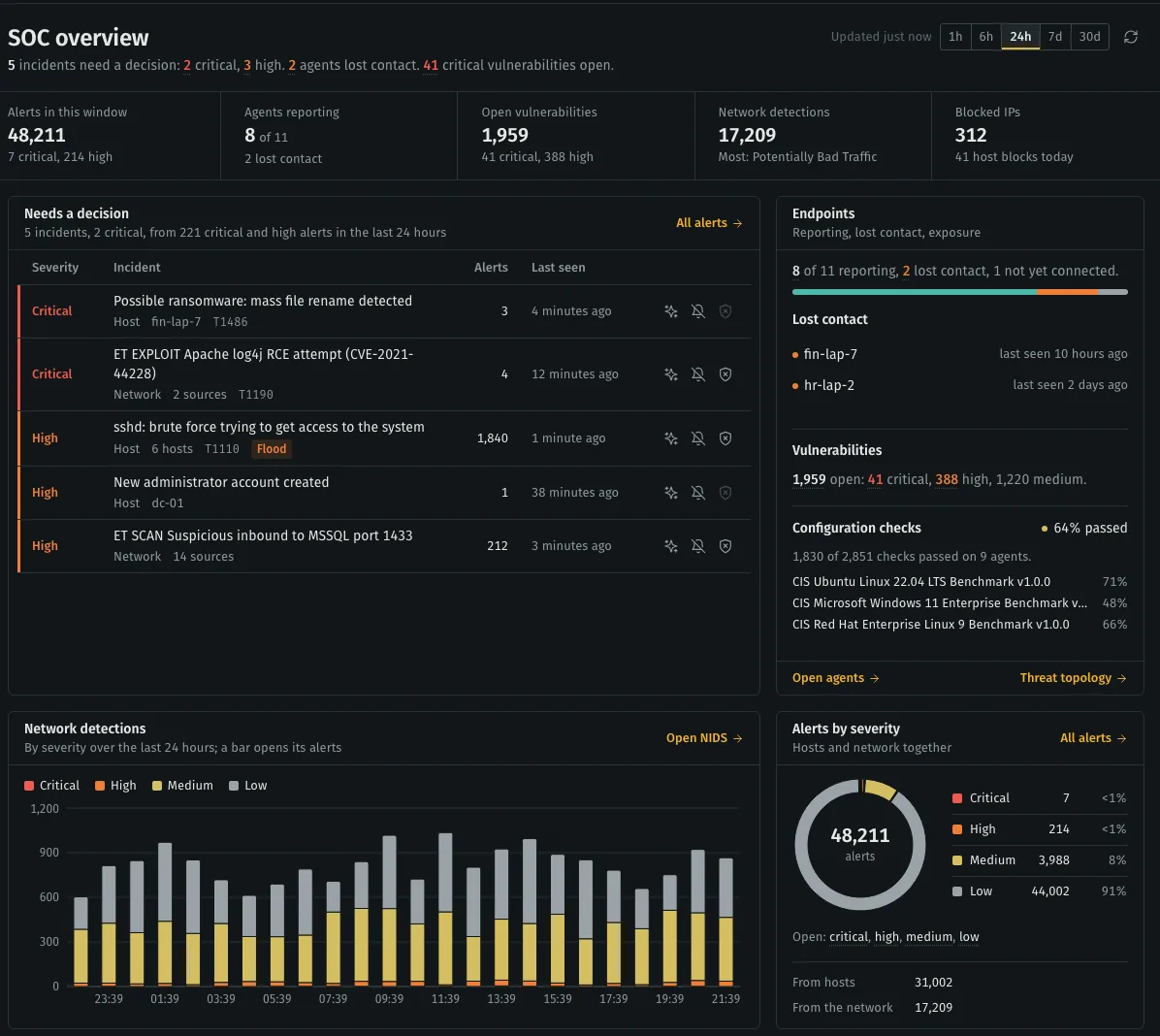
The SOC overview opens with one sentence: what needs a decision, which machines lost contact, how many critical vulnerabilities are open. Below it, the incidents waiting on you, ranked.
- Severity is written out, never colour alone.
- Each incident can be analysed, muted or blocked from its row.
- Light and dark themes, five signal colours, compact or roomy.
From contract to first alert
Four steps, each done in the console or with one command.
We set up your stack
Hosted by us, or one install command on your own Linux server. Your stack has its own data, sign-in and certificates.
You enrol your machines
One command per machine on Windows, macOS and Linux, or the MSI for Intune, Configuration Manager and Group Policy.
You connect what you already run
Firewalls, cloud accounts and Microsoft 365, set up in the console. No access to the server is needed.
Your team works the alerts
Triage, block, patch and export evidence from one console, with every action in the audit log.
Evidence your auditor can read
Choose the frameworks you report on. Schildmark maps alerts and failing configuration checks to their controls, warns when logs are kept for less time than a framework expects, and exports the evidence for a period as one ZIP file.
- SOC 2
- HIPAA
- PCI DSS
- ISO 27001
- NIST 800-53
- GDPR
Hosted by us, or on your own servers
Hosted by us
Your stack runs on its own server in our cloud. Nothing that holds your data is shared with another customer. We upgrade it and watch its health; managed backups are an add-on.
Self-hosted
One Linux server, or two for larger fleets. Alerts, events and inventory stay on your servers; our control plane sees the stack’s health, version and agent list, never its alerts.
Talk to sales
Schildmark is priced per protected machine and agreed with you. Tell us about your environment and we will send a quote, or set up a 30-day trial for up to 25 machines.